Benchmarks
How fast do phyelds programs run on each host, and what happens as the agents grow? The
harness in benchmarks/
measures it. This page shows its baseline: one world of 100 to 10,000 agents, on one core
of a laptop.
The unit is the agent-round per second: the rounds of all the agents in a second of wall time. A thousand agents that each run ten rounds a second make 10,000 agent-rounds per second.
How the hosts scale
Every agent runs distance_to. The area grows with the agents, so each agent keeps about
eight neighbors, and a flat line would mean that an agent costs the same however many
there are.
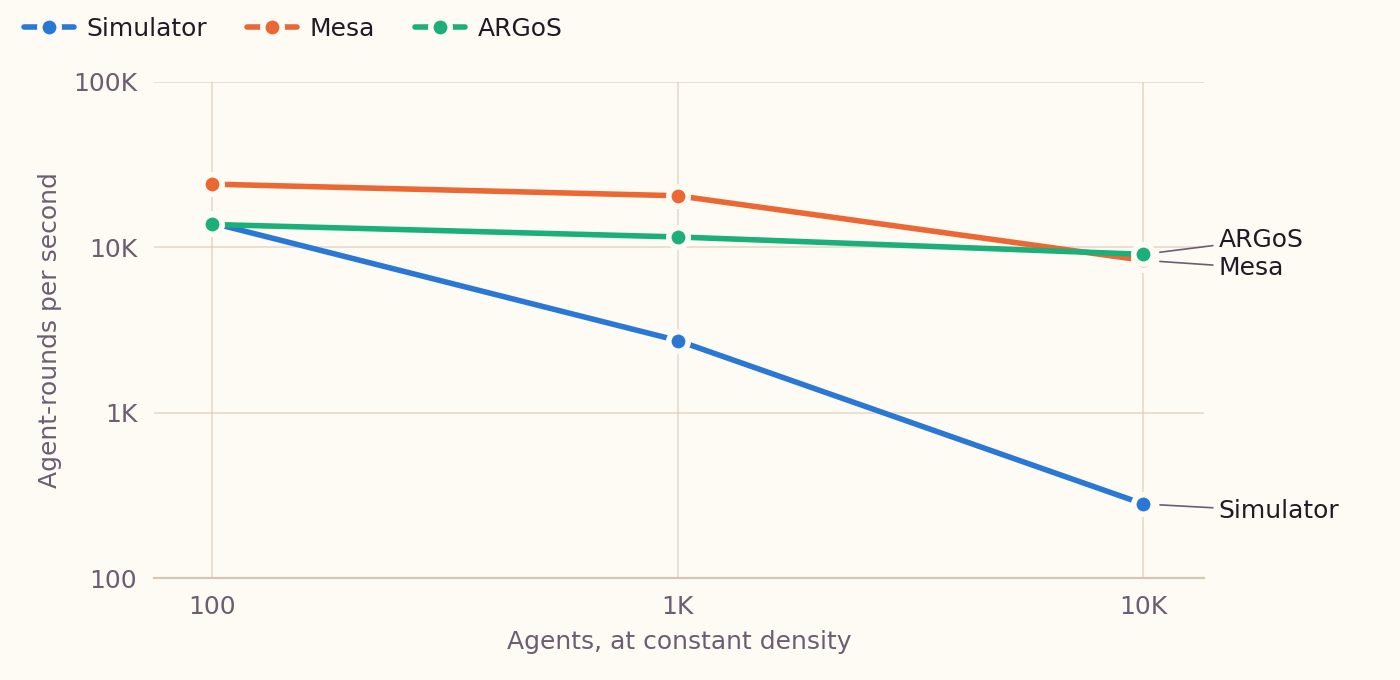
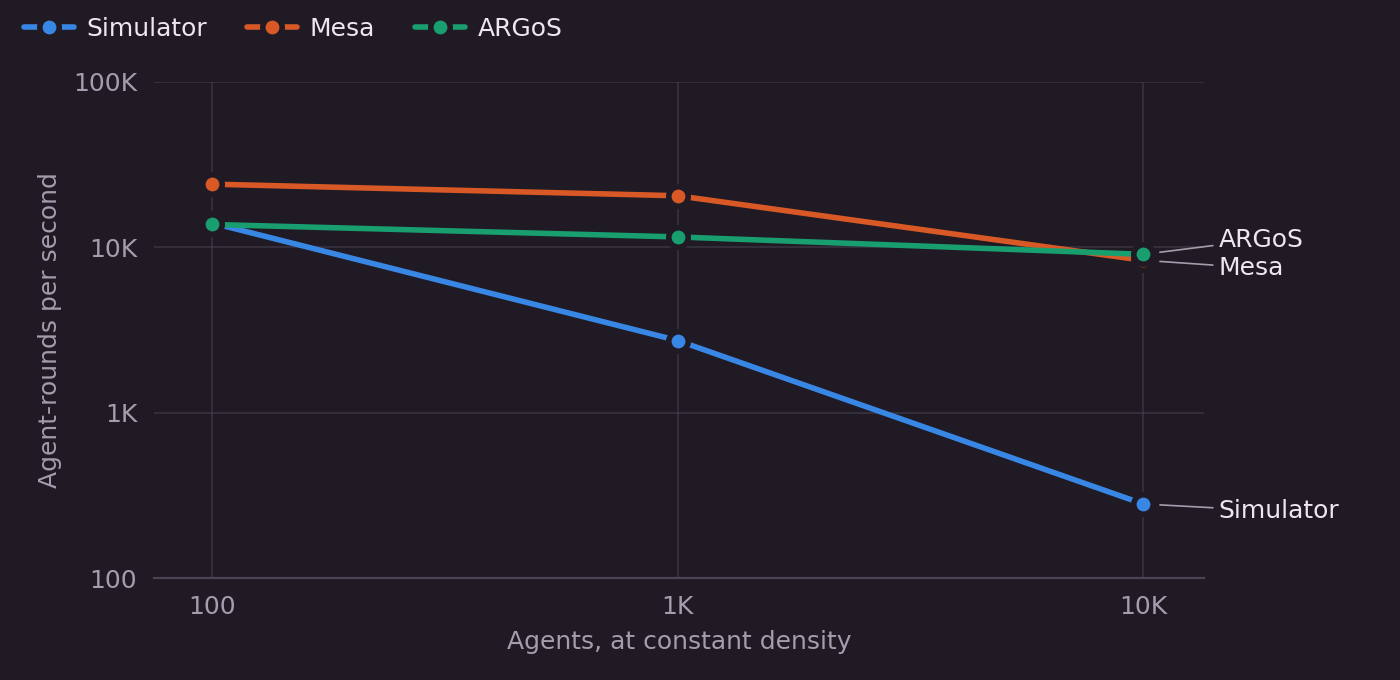
- ARGoS and Mesa keep their pace. From 100 to 10,000 agents, ARGoS loses a factor of 1.5 and Mesa a factor of 3.
- The simulator loses a factor of 50. Its
radius_neighborhoodcompares every node with every other one, so a round costs O(N²). At 10,000 agents a neighbor search takes 36 s, and a round is mostly that search.
VMAS and Webots are measured with 100 agents only (see what is missing).
What each layer costs
Each host runs three times: on its own, with the phyelds adapter running an empty program,
and with distance_to. The further left a dot moves, the more that layer costs.
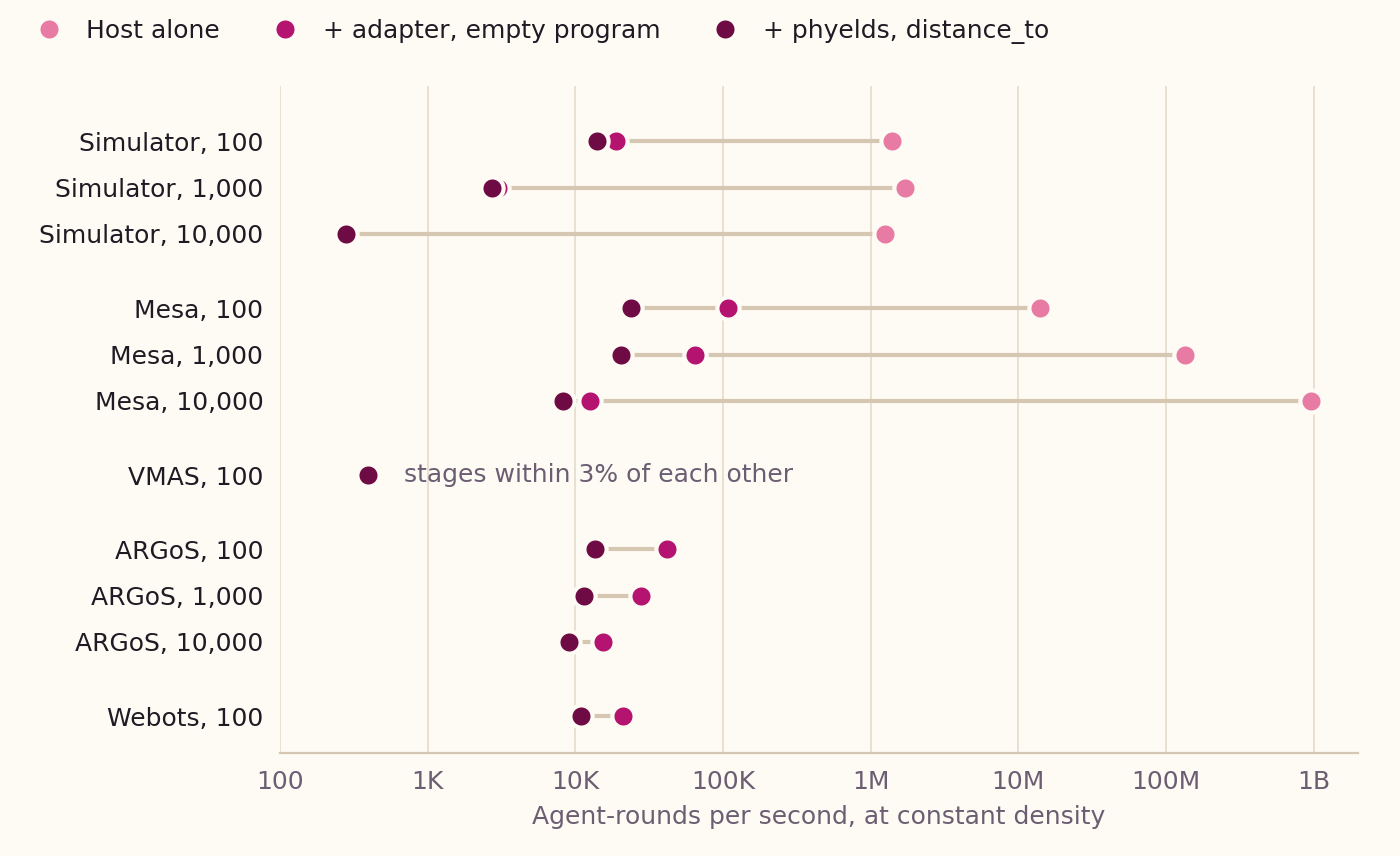
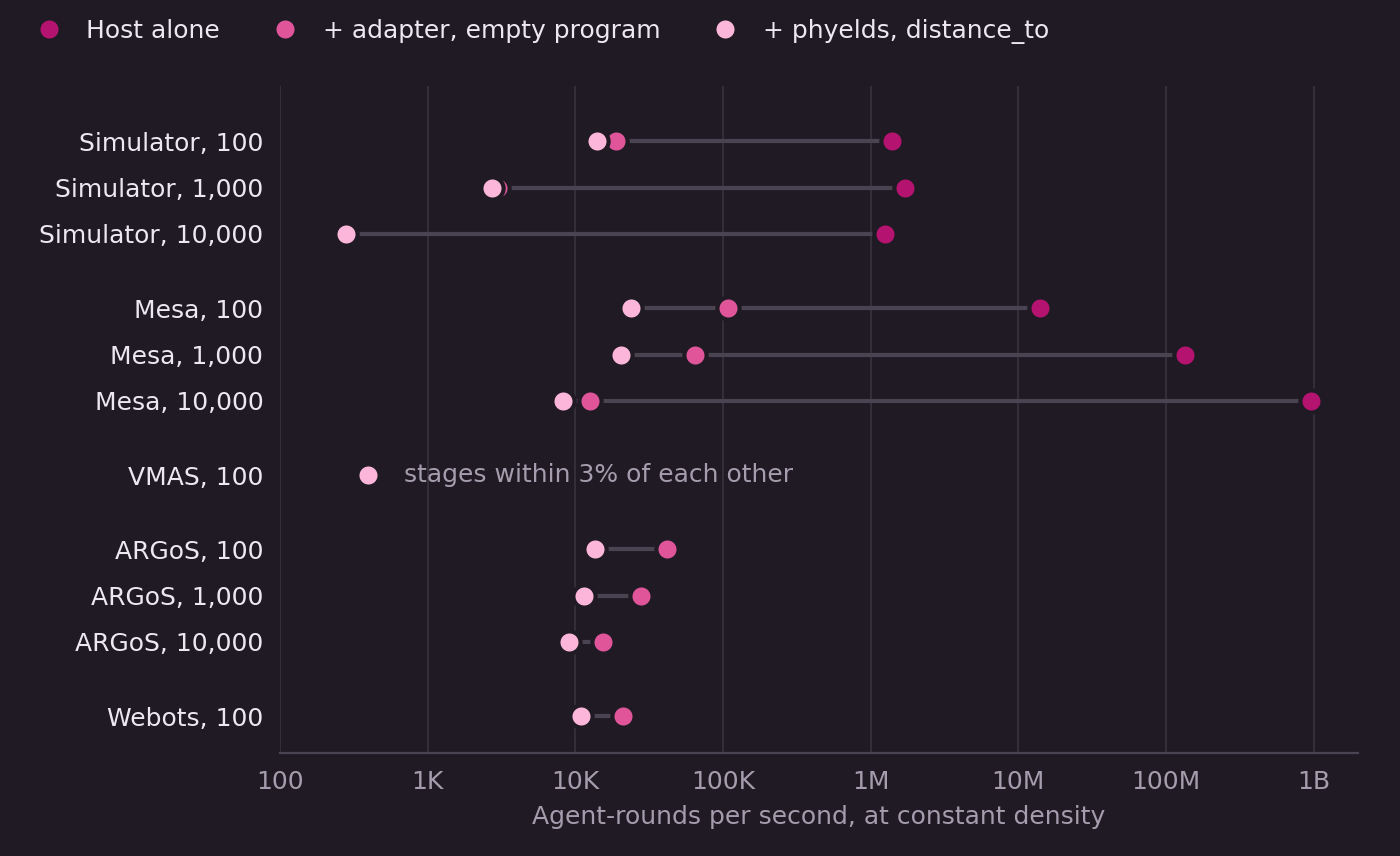
- The program costs about the same on every host.
distance_toadds about 20 to 55 µs to each round of each agent, andcount_nodes, which also collects, 60 to 165 µs. - The adapter is what tells the hosts apart. A Mesa agent alone takes a fraction of a microsecond, and the adapter adds 9 µs per agent at 100 agents, 80 µs at 10,000. In the simulator, the adapter's cost is the neighbor search, which grows with the agents: 50 µs per agent at 100 agents, 3.6 ms at 10,000.
- VMAS is bound by its own step. On the CPU, its flocking scenario takes 2.4 ms per agent and step, so phyelds does not show.
- ARGoS and Webots have no host-alone dot. Their robots need a controller to run, and Webots alone runs its rounds faster than it starts.
All the measurements
Agent-rounds per second of each stage, M for millions. Empty runs the adapter with a program that does
nothing; Gradient, Gossip and Count run distance_to, gossip_max and count_nodes
(benchmarks/programs.py). At constant density, each agent has about eight neighbors. At
constant area, the agents share the area of 1,000, so the density grows with them.
| Host | Agents | Layout | Host alone | Empty | Gradient | Gossip | Count |
|---|---|---|---|---|---|---|---|
| Simulator | 100 | density | 1.4M | 18,861 | 13,982 | 16,788 | 8,995 |
| Simulator | 100 | area | 2.0M | 25,914 | 16,418 | 17,356 | 10,209 |
| Simulator | 1,000 | density | 1.7M | 2,991 | 2,722 | 2,784 | 2,384 |
| Simulator | 1,000 | area | 1.7M | 2,979 | 2,726 | 2,782 | 2,387 |
| Simulator | 10,000 | density | 1.3M | 274 | 280 | 282 | 279 |
| Simulator | 10,000 | area | 1.4M | 285 | 276 | 274 | 267 |
| Mesa | 100 | density | 14.1M | 108,815 | 24,000 | 28,383 | 11,626 |
| Mesa | 100 | area | 12.5M | 121,326 | 27,769 | 32,265 | 13,901 |
| Mesa | 1,000 | density | 134.3M | 65,026 | 20,420 | 22,689 | 10,288 |
| Mesa | 1,000 | area | 126.0M | 66,624 | 19,774 | 23,198 | 10,270 |
| Mesa | 10,000 | density | 964.3M | 12,598 | 8,317 | 9,021 | 5,845 |
| Mesa | 10,000 | area | 954.9M | 11,306 | 6,517 | 7,096 | 3,628 |
| VMAS | 100 | density | 411 | 406 | 397 | 398 | 389 |
| VMAS | 100 | area | 413 | 403 | 397 | 396 | 391 |
| ARGoS | 100 | density | — | 41,657 | 13,693 | 16,704 | 6,998 |
| ARGoS | 100 | area | — | 63,600 | 21,708 | 24,677 | 10,303 |
| ARGoS | 1,000 | density | — | 28,019 | 11,512 | 13,428 | 6,113 |
| ARGoS | 1,000 | area | — | 29,027 | 11,567 | 13,534 | 6,287 |
| ARGoS | 10,000 | density | — | 15,445 | 9,039 | 7,650 | 4,365 |
| Webots | 100 | density | — | 20,959 | 10,931 | 11,433 | 6,837 |
| Webots | 100 | area | — | 23,403 | 12,355 | 12,388 | 9,009 |
The neighbor search of all the agents, timed on its own, the messages delivered in a round, and the peak memory: of the measurement, or of its largest process for ARGoS and Webots.
| Host | Agents | Layout | Neighbor search (s) | Messages per round | Peak memory (MB) |
|---|---|---|---|---|---|
| Simulator | 100 | density | 0.00448 | 636 | 30 |
| Simulator | 100 | area | 0.00317 | 0 | 30 |
| Simulator | 1,000 | density | 0.321 | 7,132 | 66 |
| Simulator | 1,000 | area | 0.321 | 7,132 | 66 |
| Simulator | 10,000 | density | 36.7 | 72,768 | 114 |
| Simulator | 10,000 | area | 35.4 | 749,840 | 114 |
| Mesa | 100 | density | 0.000594 | 636 | 120 |
| Mesa | 100 | area | 0.000536 | 0 | 121 |
| Mesa | 1,000 | density | 0.0102 | 7,132 | 129 |
| Mesa | 1,000 | area | 0.0103 | 7,132 | 129 |
| Mesa | 10,000 | density | 0.741 | 72,768 | 210 |
| Mesa | 10,000 | area | 0.783 | 749,840 | 210 |
| VMAS | 100 | density | 0.00328 | 636 | 230 |
| VMAS | 100 | area | 0.00333 | 0 | 230 |
| ARGoS | 100 | density | — | — | 51 |
| ARGoS | 100 | area | — | — | 50 |
| ARGoS | 1,000 | density | — | — | 113 |
| ARGoS | 1,000 | area | — | — | 114 |
| ARGoS | 10,000 | density | — | — | 752 |
| Webots | 100 | density | — | — | 300 |
| Webots | 100 | area | — | — | 300 |
- Machine: AMD Ryzen AI 9 HX PRO 370 with 30 GB, Linux 7.0, Python 3.13.2, phyelds 9.3.1. Mesa 3.5.1, VMAS 1.5.2 with PyTorch 2.5.1 on the CPU, ARGoS 3 and Webots R2025a.
- Cores: each measurement ran on one Zen 5 core (
taskset -c 2). Webots, which runs a process per robot, ran on the eight Zen 5 CPUs (taskset -c 0-3,12-15). - Rounds: 10 for the simulator, Mesa and VMAS (2 for the simulator at 10,000), 100 for ARGoS (60 at 10,000) and 500 for Webots. ARGoS and Webots run in processes of their own, so their time leaves the start-up out.
- Seed: 1, so every host gets its agents in the same places.
What is missing
- 100 agents at constant area: the agents are spread over the area of 1,000, out of each other's range, so they exchange no messages. At 1,000 the two layouts are the same.
- VMAS beyond 100 agents: on its own, its flocking scenario takes tens of seconds a step with 1,000 agents.
- ARGoS at 10,000, constant area: it takes over half an hour to start 10,000 foot-bots packed in the area of 1,000. At constant density it takes about 5 minutes.
- Webots beyond 100 robots: each robot is a Python process, which caps Webots at a few hundred robots on one machine.
These are measurement points, not promises: they change with the machine, the programs and the release.
Measuring again
poetry run python benchmarks/run.py --hosts mesa --nodes 100 1000 > results.jsonl
poetry run python docs/examples/benchmarks.py   # redraw the charts
Pin the measurements to one core, e.g. with taskset -c 2 on Linux: on a processor with
cores of different speeds, a measurement that is not pinned can land on either.
The benchmarks README
lists the hosts, stages and metrics, and how to measure each host. The measurements of this
page are in benchmarks/baseline.jsonl, one JSON line each, with their environment.